
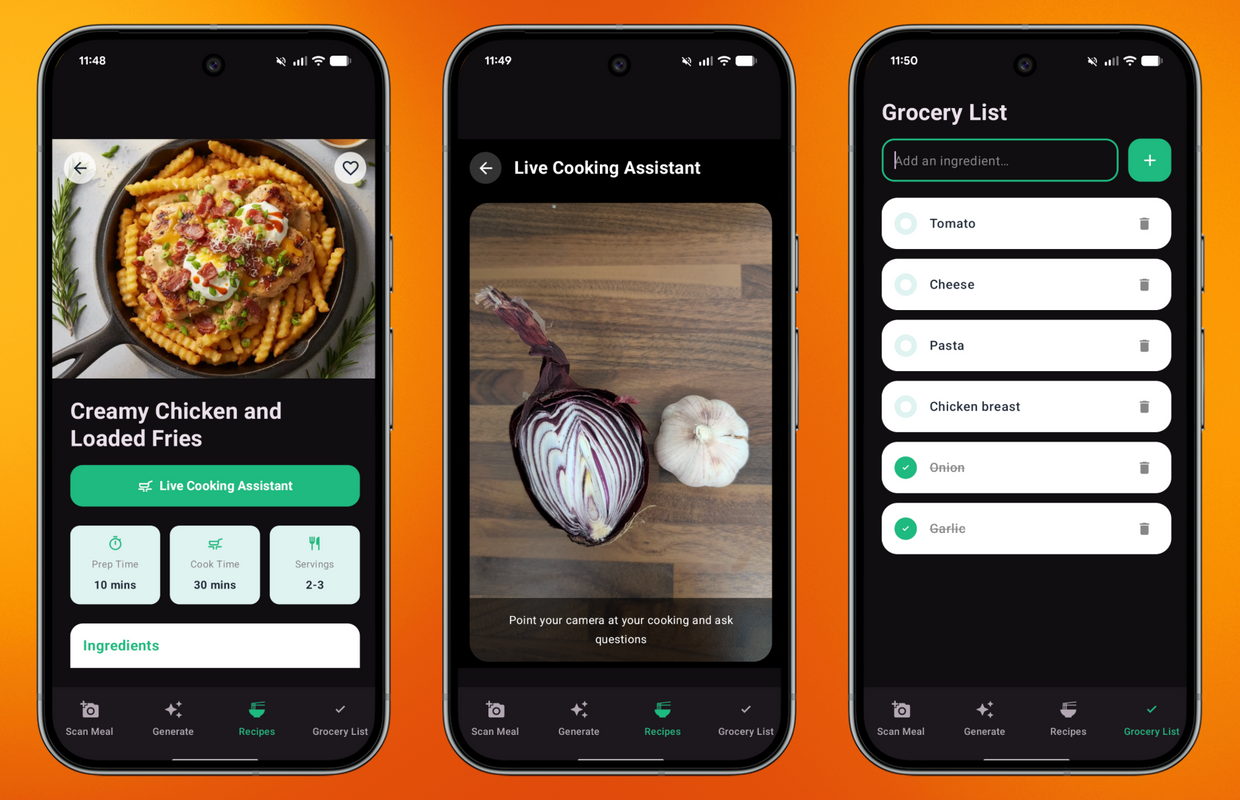
Last week, I decided to put Firebase AI Logic to the test by adding a new feature to the Friendly Meals Android app. Picture this: you’re in the kitchen, your hands are covered in flour and you need to check what’s the next step in the recipe. The next step requires handling raw chicken, and while you’re at it, you remember that you need to get more garlic because you just used the last clove!
Wouldn’t it be easier if you could leave your phone pointed at your cooking area and ask questions as you cook? Wouldn’t it be so handy if a cooking assistant could add the missing ingredients to your grocery list without lifting a finger?
That’s what I wanted to build: a real-time cooking assistant combining the conversational speed of the Gemini Live API with the power of function calling. In this post, I’ll show you how you can leverage bidirectional streaming video and client-side function calling to build more complex and helpful features.
Firebase AI Logic
Firebase AI Logic provides secure client SDKs that lets mobile and web developers interact directly with Google’s generative models. Rather than routing streaming video and audio through a custom backend (and figuring out secure authentication on your own, or even how to deal with WebSockets), Firebase AI Logic manages a secure connection for you and protects your resources when you add Firebase Authentication and Firebase App Check to your projects.
The Friendly Meals cooking assistant uses a Gemini Live model to establish a bidirectional stream. The user shows the cooking area and speaks to the model, the model processes the video stream, understands intent having the current recipe as context, and streams audio responses back quickly.
This model can also handle function calling, a capability that is very handy when you need to extend the model’s knowledge and enable it to act like an agent, triggering actions and performing tasks on your behalf.
How Friendly Meals implements Gemini Live
Let’s inspect the key changes on Friendly Meals to make this cooking companion a reality.
Adding Android permissions
Because I’m building my video assistant on Android, the AndroidManifest.xml requires permission to capture microphone and camera data:
<uses-permission android:name="android.permission.CAMERA" />
<uses-permission android:name="android.permission.RECORD_AUDIO" />
<uses-feature android:name="android.hardware.camera" android:required="false" />The first two lines are requesting the necessary permissions. The last line is telling the Android system and the Google Play Store that the app has some camera features, but these features are not required for the app to work. This is important because it allows users without a camera to still download your app and use the features that don’t rely on it.
Initializing the Live Model and customizing behavior
Friendly Meals has a dedicated class to handle the lifespan of the streaming session: LiveAIRemoteDataSource. It begins by initializing a LiveGenerativeModel instance, passing the appropriate model name, a voice character profile, and the response modality:
suspend fun setupLiveSession(recipe: Recipe): LiveSession? {
  val liveGenerationConfig = liveGenerationConfig {
    speechConfig = SpeechConfig(voice = Voice(LIVE_MODEL_VOICE))
    responseModality = ResponseModality.AUDIO
  }

  val promptTemplate = remoteConfig.getString(LIVE_MODEL_PROMPT_KEY)
  val instructionText = formatInstructionPrompt(promptTemplate,recipe)

  val liveModel = aiModel.liveModel(
    modelName = remoteConfig.getString(LIVE_MODEL_NAME_KEY),
    generationConfig = liveGenerationConfig,
    systemInstruction = content { text(instructionText) }
  )

  return try {
    liveModel.connect()
  } catch (_: Exception) {
    null
  }
}

companion object {
  //Live Model Config
  private const val LIVE_MODEL_VOICE = "CHARON"

  //Remote Config Keys
  private const val LIVE_MODEL_NAME_KEY = "live_model_name"
  private const val LIVE_MODEL_PROMPT_KEY = "live_model_prompt"
}It also needs some system instructions to define the culinary expert persona, and specify what recipe the user is currently cooking. Notice that both prompt and model name are stored in Firebase Remote Config. This allows me to store them on the server and update them at any time, without requiring my users to install another version of my app if I need to modify either model or prompt.
These are the instructions I stored in Remote Config:
You are a helpful live cooking assistant. The user is currently preparing the following recipe:
Title: {{title}}
Prep time: {{prepTime}}, Cook time: {{cookTime}}, Servings: {{servings}}

Ingredients:
{{ingredients}}

Instructions:
{{instructions}}

The user will stream real-time video of their cooking and ask questions like "Is this the expected texture of the recipe?".
Confirm or deny accurately based on the recipe context and the video content. Be concise and helpful.
If the user asks you to add an ingredient or item to their grocery list or shopping list, call the addIngredientToGroceryList function.I then use Kotlin’s replace function to format my prompt:
private fun formatInstructionPrompt(template: String, recipe: Recipe): String {
  return template
    .replace("{{title}}", recipe.title)
    .replace("{{prepTime}}", recipe.prepTime)
    .replace("{{cookTime}}", recipe.cookTime)
    .replace("{{servings}}", recipe.servings)
    .replace("{{ingredients}}", recipe.ingredients.joinToString("\n") )
.replace("{{instructions}}", recipe.instructions)Quick note: We highly recommend protecting your model configuration, system instructions and prompt with Server Prompt Templates in Firebase AI Logic. Bidirectional streaming is not yet supported by templates, but you should prioritize using them for all the models and capabilities we support.
Handling the stateful live session
To handle the bidirectional streaming, the LiveAssistantViewModel calls the setupLiveSession function shown above, and stores the current session in the liveSession object. The view model is responsible for starting and ending the live session according to the taps performed by the user:
- Starts session when the user taps on the “Live Cooking Assistant” button, available in the Recipe screen
- Ends session when the user taps on the button to close the Assistant, available in the navigation bar at the top of the screen
The view model uses the liveSession object to send video frames to the Gemini Live model, as seen on the function below:
fun sendVideoFrame(bitmap: Bitmap) {
  if (!isConnected || liveSession == null) return

  val currentTime = System.currentTimeMillis()

  // Limit sending frames to once per second to conserve bandwidth and processing
  if (currentTime - lastFrameTime < 1000) return
  lastFrameTime = currentTime

  launchCatchingIO {
    val outputStream = ByteArrayOutputStream()
    bitmap.compress(Bitmap.CompressFormat.JPEG, 80, outputStream)
    val jpegBytes = outputStream.toByteArray()
    liveSession?.sendVideoRealtime(InlineData(jpegBytes, MIME_TYPE))
  }
}Enabling hands-free actions with function calling
A conversational UI is great, but a true assistant needs to affect the application state. If a user says, “Hey chef, I just used the last of the olive oil, add it to my shopping list,” or “We’re out of garlic,” the model shouldn’t just reply, “Okay, I’ve noted that.” It needs to execute that action inside the app. Let’s see how I achieved that with function calling.
Defining the tool
First, I declared my tool to manage grocery items in LiveAIRemoteDataSource:
private val groceryListTool = Tool.functionDeclarations(listOf(
  FunctionDeclaration(
    name = "addIngredientToGroceryList",
    description = "Adds a specified ingredient to the user's grocery list in the database.",
    parameters = mapOf("ingredient" to Schema.string("The name of the ingredient to add."))
  )
))Registering the tool
Next, I added the new tool directly to the LiveModel configuration, when I’m creating an instance of the live model:
val liveModel = aiModel.liveModel(
  modelName = remoteConfig.getString(LIVE_MODEL_NAME_KEY),
  generationConfig = liveGenerationConfig,
  systemInstruction = content { text(instructionText) },
  tools = listOf(groceryListTool)
)Creating the session handler
Lastly, I updated the view model to send a session handler as a parameter when starting a new session. This handler is of type FunctionResponsePart and defines what happens if the addIngredientToGroceryList tool is called:
private fun handler(functionCall: FunctionCallPart): FunctionResponsePart {
  if (functionCall.name == "addIngredientToGroceryList") {
    val ingredient = functionCall.args["ingredient"]
    val ingredientName = when (ingredient) {
      is JsonPrimitive -> ingredient.content
      else -> ingredient?.toString()
    }?.trim()?.removeSurrounding("\" ")

    if (!ingredientName.isNullOrBlank()) {
      val userId = authRepository.currentUser?.uid.orEmpty()

      if (userId.isNotEmpty()) {
        launchCatching {
          val item = GroceryItem(
            userId = userId,
            name = ingredientName,
            checked = false
          )
          databaseRepository.addGroceryItem(item)
        }
      }
    }

    return FunctionResponsePart(
      functionCall.name,
      JsonObject(mapOf("result" to JsonPrimitive("Successfully added $ingredientName to grocery list"))),
      functionCall.id
    )
  }

  return FunctionResponsePart(functionCall.name, JsonObject(emptyMap()), functionCall.id)
}The code above checks if the function being called is the one registered previously. If so, it performs some checks on the data: First, checks if it’s a JSON object to get the content, or if it’s a normal string to trim and clear the surroundings. Second, it checks if the resulting ingredient name is null or blank. Last, it gets the current logged-in user and stores the ingredient in their grocery list.
Now when the user asks the cooking assistant to add garlic (or any other ingredient!) to their list, the model will be able to detect the user’s intent, map it to the addIngredientToGroceryList tool, extract the string “garlic”, and trigger the function.
Going to production
Before shipping your apps to production, make sure you are protecting them with App Check. By adding App Check, you ensure only your legitimate app running on untampered devices can call any Firebase backend services. It helps protect your backend from abuse, such as billing fraud, phishing, app impersonation, and data poisoning.
Check out the App Check documentation to learn more about it.
Build your own real-time features
With client-side streaming and secure client-to-server management handled entirely via Firebase AI Logic, you don’t need a single line of backend infrastructure to bring agentic voice and video experiences into your mobile and web apps.
Head over to the Friendly Meals GitHub repository to review the codebase in full, see how the app manages UI states during active sessions, and start building hands-free, real-time features into your own apps!