
Firestore Enterprise edition now has support for text search built-in! Here are a couple of ways to implement search in a React web app.
Searching a collection
Setup
First, I created a text index for the recipes collection. Firestore Enterprise databases don’t require indexes for most features, but they do require it for text search.
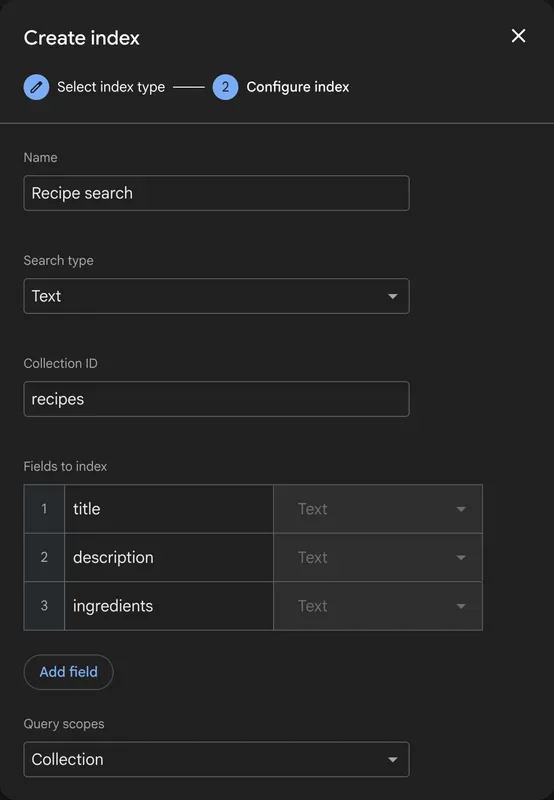
The index includes multiple fields to give a better chance of returning a relevant result.
Now, I can use the .search() pipeline to search my indexed collection. Here’s an example in plain TypeScript, before I move on to adding it to a React app.
import { initializeApp } from "firebase/app";
import { initializeFirestore } from "firebase/firestore";
import { documentMatches, execute, score } from "firebase/firestore/pipelines";

import { firebaseConfig } from "./firebaseConfig";

const firebaseApp = initializeApp(firebaseConfig);

const searchTerm = "chicken";
let pipeline = initializeFirestore(firebaseApp, {}, "default")
  .pipeline()
  .collection("recipes")
  .search({
    query: documentMatches(searchTerm),
    sort: score().descending(),
  })
  .limit(10);

const { results } = await execute(pipeline);
console.log(`Found ${results.length} entries for "${searchTerm}"`);The documentMatches expression in the search stage searches across all of the indexed fields in the “Recipe search” index created above.
A SearchResults component with React Suspense
To create a React component that can search a Firestore collection, it helps to use a query library that’s optimized for the React component lifecycle like Tanstack Query or SWR. In this case, I’m using Tanstack Query’s useSuspenseQuery, which integrates with React Suspense to make loading states to automatically show fallback content while a query is loading:
import { useSuspenseQuery } from "@tanstack/react-query";

import { initializeApp } from "firebase/app";
import { initializeFirestore } from "firebase/firestore";
import { documentMatches, execute, score } from "firebase/firestore/pipelines";

import { firebaseConfig } from "./firebaseConfig";
const firebaseApp = initializeApp(firebaseConfig);

export function SearchResults({ searchTerm }: { searchTerm: string }) {
  const { data } = useSuspenseQuery({
    queryKey: ["recipes", "search", searchTerm],
    queryFn: async () => {
      let pipeline = initializeFirestore(firebaseApp, {}, "default")
        .pipeline()
        .collection("recipes");

      if (searchTerm.trim().length > 0) {
        console.log(`querying for ${searchTerm}`);
        pipeline = pipeline.search({
          query: documentMatches(searchTerm),
          // show the most relevant items first
          sort: score().descending(),
        });
      }

      pipeline = pipeline.limit(10);
      const { results } = await execute(pipeline);
      return results;
    },
  });

  return (
    <>
      <ul>
        {data.map((docSnap) => {
          const { title } = docSnap.data();
          return <li key={docSnap.id}>{title}</li>;
        })}
      </ul>
      {searchTerm.length > 0 ? <p>
        {data.length} results for "{searchTerm}"
      </p> : <p>Enter a search term to filter</p>}
    </>
  );
}Here’s how it works:
searchTerm is passed in as a prop from a parent component. I’m only adding search to the pipeline if the searchTerm is not empty. If the searchTerm is empty, I return ten items from the collection, thanks to the limit stage.
Notice that there is no loading state management in my code. useSuspenseQuery lets me offload that onto the parent components that wrap this component, which makes this SearchResults component reusable.
React patterns for search
Now that we have a component that can search Firestore, let’s look at a basic search, and then upgrade that to a live search that updates as the user types. Both of these components use the SearchResults component above.
Search-on-submit
In this Search component, a new search starts when the user submits a search form.
export function Search() {
  const [searchTerm, setSearchTerm] = useState("");

  return (
    <>
      <article>
        <form action={(formData) => setSearchTerm((formData.get("query") as string) ?? "")}>
          <input name="query" type="search" placeholder="Search" />
          <input type="submit" value="Search" />
        </form>
        <Suspense fallback={<span aria-busy="true">Searching...</span>}>
          <SearchResults searchTerm={searchTerm} />
        </Suspense>
      </article>
    </>
  );
}I’m maintaining searchTerm with useState and passing it as a prop to the SearchResults component. I’ve wrapped SearchResults in a Suspense component that will automatically render the fallback while we wait for the search to complete.
To set the searchTerm, I have an input of type search within a form. In the form’s action prop I have a handler that gets the search query from formData and updates searchTerm. That in turn causes the Search component to re-render, passing a new search term to SearchResults.
Live search
In the LiveSearch component, I’ve implemented the same form as above, but with an enhancement. Now, searches also happen as the user types. The input is debounced to avoid performing unnecessary searches.
export function LiveSearch() {
  const [searchTerm, setSearchTerm] = useState("");
  const deferredSearchTerm = useDeferredValue(searchTerm);

  // Keep track of the currently typed search query,
  // and use it to start a search after a delay
  const [liveSearchTerm, setLiveSearchTerm] = useState(searchTerm);
  useEffect(() => {
    const timer = setTimeout(() => {
      setSearchTerm(liveSearchTerm);
    }, 300);

    return () => {
      clearTimeout(timer);
    };
  }, [liveSearchTerm]);

  return (
    <>
      <article>
        <form action={() => setSearchTerm(liveSearchTerm)}>
          <input
            name="query"
            type="search"
            placeholder="Search"
            value={liveSearchTerm}
            onChange={(e) => setLiveSearchTerm(e.target.value)}
          />
          <input type="submit" value="Search" />
        </form>
        <Suspense fallback={<span aria-busy="true">Searching...</span>}>
          <SearchResults searchTerm={deferredSearchTerm} />
        </Suspense>
      </article>
    </>
  );
}The search input updates the liveSearchTerm state variable whenever it changes. Since I’ve included liveSearchTerm in the dependency array of useEffect, the debouncing function re-runs every time liveSearchTerm changes, calling setSearchTerm on a 300ms delay.
Live search would work if I stopped there. However, there would be an annoying flash of loading state every time searchTerm updates, as SearchResults re-queries the Firestore collection:
To prevent that, I’ve introduced another variable, deferredSearchTerm, that is synced with searchTerm via useDeferredValue to show stale content while fresh content is loading. Now, instead of a flash of loading state every time searchTerm changes, React knows to just keep the results of the last search on the screen until the new search completes.
It might seem like the debouncing useEffect hook and useDeferredValue are redundant, but they’re solving two different problems. Debouncing cuts the number of searches against the database, reducing cost, while useDeferredValue prevents loading state jank.
Summary
Live search is a great way to let users find things quickly in your app, and with Firestore pipelines and modern React APIs, it doesn’t take much code to implement.
To make this even better, here are ideas for some other potential enhancements:
- Store the search term in the URL query string so that a search can be bookmarked, or even executed in a Server Component.
- Right now,
searchis performed if the query is at least 1 character long. Based on what you’re searching through, it might make sense to restrict search even more, to a minimum of 3 or 4 characters. - Include the search score of each item by using
addFieldsin the search stage. - Use other pipeline features to allow more advanced filtering of data, like in the FriendlyMeals-web sample.
If you’re inspired to try this out, let us know how it went on X or LinkedIn!