
Gemini text-to-speech (TTS) models enable direct audio generation from text prompts in apps via Firebase AI Logic. This means you can now add natural, customizable voice generation features into your mobile and web apps to create richer, more engaging experiences.
Need some ideas? In this post, we’ll share five use cases for Gemini TTS with examples of real-world apps, give you an overview of how it works, and help you get started with Firebase AI Logic.
1. Interactive language learning & Conversation practice
For educational and language learning apps, speech generation unlocks new possibilities by providing realistic listening comprehension drills and conversational simulation. Instead of static audio recordings, Gemini can dynamically synthesize dialogue tailored to specific language learning levels, regional accents, or custom practice scenarios.
Real-world example: Finnish it
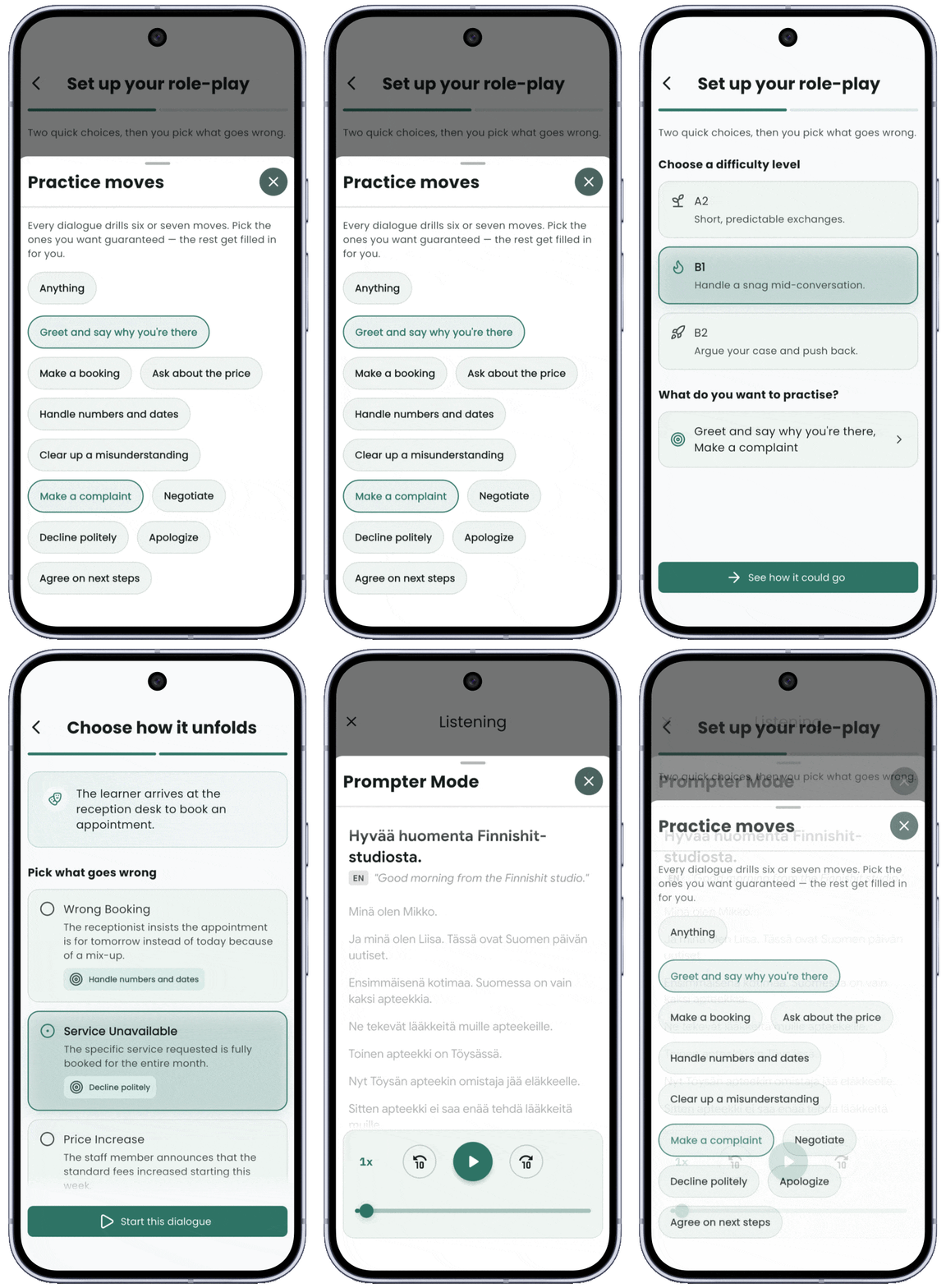
The coaching app (Finnish it) helps adult immigrants in Finland prepare for their national language certificate (YKI). Using Firebase AI Logic and Gemini TTS, the app dynamically generates full exercise structures and synthesizes the partner’s dialogue to simulate intermediate-level paired conversation tasks in real time.
I was already generating speech with Gemini TTS before this [feature release], but on the server, for a daily easy-Finnish news podcast. Generating on the client with Firebase AI Logic eliminates the middleman completely. The audio streams directly to the device, drastically cutting latency, dropping server costs for this feature to zero, and preserving the magic of an instantly generated practice session.
2. Hands-free & Context-aware content reading
If people are active and moving when using your app—such as cooking, engaging in physical activity, or navigating places—audio instruction is essential. Gemini TTS can convert complex written guides or recipe steps into warm, natural, and authentic speech capable of handling specialized terminology and abbreviations. As a result, users can follow audio instructions smoothly without breaking their focus or pausing their activity.
Real-world example: Meal Planner & Grocery List
In the Meal Planner & Grocery List app (Jojo Apps), Gemini TTS is integrated directly into cooking workflows to read recipe instructions aloud. It can smoothly decipher and read abbreviations for recipe measurement in Belgian Dutch (nl-BE), delivering a warmer and far less robotic experience than standard system text-to-speech.
The pacing is better, the delivery is less robotic, and the overall experience is much more engaging. The voice also sounds warmer and more motivational, which works particularly well for guiding users through cooking instructions.
3. Real-time accessibility & Content summarization
You can also use Gemini TTS to improve digital accessibility across your app by providing instant audio renditions of text content, UI controls, or AI-generated summaries. This can expand your user base by giving visually impaired users or multi-taskers access to your content, articles, or notifications which can be read aloud with natural pacing.
4. Interactive storytelling & Media narration
For entertainment and content apps, you can keep users engaged longer by generating expression audio narratives that make digital books, games, and stories more captivating. All you need to do is steer Gemini TTS to switch character voices, adjust speaking speed, or adapt emotional tone dynamically based on story progression and narrative mood.
5. Multi-Speaker podcasts & Dialogue simulations
Synthesize entire multi-character conversations or podcasts directly on the device. By assigning distinct voices to named speakers, apps can generate natural back-and-forth discussions, news overviews, or dual-speaker audio lessons without needing complex server-side render pipelines.
How it works
The Gemini Native Audio Generation Text-to-Speech (TTS) model differentiates itself from conventional TTS models by using a large language model. It knows not only what to say, but also how to say it.
You can control the speech output using:
- Audio profile: Define the character’s core identity, archetype, and vocal characteristics.
- Scene and vibe: Establish the physical environment, ambiance, and mood of the scene.
- Director’s notes: Give granular guidance on speaking style (whisper, dramatic), accent (British, American, etc.), and pacing.
- Voice and language selection: Choose from over 30 multilingual voices, and the model can also automatically detect and switch languages dynamically.
What is produced: Based on your guidance, Gemini TTS models return high-quality, continuous PCM audio streams directly to the client device, allowing immediate playback buffer queuing with minimal latency. Below is an example of Kotlin integration showing how to prompt the model and stream PCM audio chunks directly within your app using Firebase AI Logic.
// Set `responseModalities` to include `AUDIO`.
// Configure a `SpeechConfig` with your chosen voice name (and optionally a language code).
val config = generationConfig {
    responseModalities = listOf(ResponseModality.AUDIO)
    speechConfig = SpeechConfig(
        voice = Voice("Charon"),
        languageCode = "en-GB"
    )
}

// Initialize the Gemini Developer API backend service.
val model = Firebase.ai(backend = GenerativeBackend.googleAI())
    .generativeModel(
        // Make sure to check the docs for the latest TTS model.
        modelName = "gemini-3.1-flash-tts-preview",
        generationConfig = config
    )

// Provide a text prompt (AI Generated).
val prompt = """Read the following transcript based on the audio profile and director's note.

# Audio Profile
A warm, engaging travel guide.

# Director's note
Style: Conversational. Pace: Relaxed but enthusiastic. Accent: British (GB).

## Scene:
A bustling piazza in Florence, Italy, bathed in golden afternoon sunlight.

## Sample Context:
Travel documentary. Friendly, inviting pace with brief pauses to take in the scenery. Tone is appreciative and cultured.

## Transcript:
[greeting] Welcome to Florence, the cradle of the Renaissance. [description] As we walk through this sun-drenched piazza, just look at the magnificent architecture surrounding us. [sensory] You can hear the gentle splashing of the fountain and smell the rich aroma of espresso drifting from the nearby cafes. [invitation] Take a moment to simply stand here and let the history of this incredible city wash over you."""


// Call `generateContentStream` to generate the speech output stream based on your text prompt.
// Extract the audio data and handle it for downstream use.
model.generateContentStream(prompt).collect { chunk ->
    val part = chunk.candidates.firstOrNull()?.content?.parts?.firstOrNull()
    if (part is InlineDataPart) {
        val pcmChunk = part.inlineData  // Raw PCM bytes (24kHz, 1 channel, 16-bit)
        val mimeType = part.mimeType    // for example: "audio/pcm"

        // Append the audio chunk to your audio queue/buffer for playback.
        appendAudioChunk(pcmChunk)
    }
}
You can build highly expressive, context-aware audio features directly inside your client apps in a scalable, low-latency way by calling Gemini’s text-to-speech models via Firebase AI Logic. Whether you want to add interactive tutors, or hands-free utilities or dynamic narration, Firebase AI Logic makes it easy to augment your app with natural voice experiences through Gemini’s TTS capabilities by eliminating backend complexity.
Try it yourself
Ready to integrate text-to-speech capabilities into your application? Gemini TTS models are available today across Swift, Kotlin, Java, JavaScript, Dart, and Unity. Explore the Firebase AI Logic Text-to-Speech documentation to get started.