

Authentication can be hard enough on its own. But building an e-commerce experience where shoppers can add to cart before signing up, and then transition to a permanent account without losing their items?
That’s where things really get tricky. The use cases for e-commerce require us to tackle complex edge cases of identity management and database security all at once.
You can solve all of these problems cleanly with Firebase Authentication and Cloud Firestore.
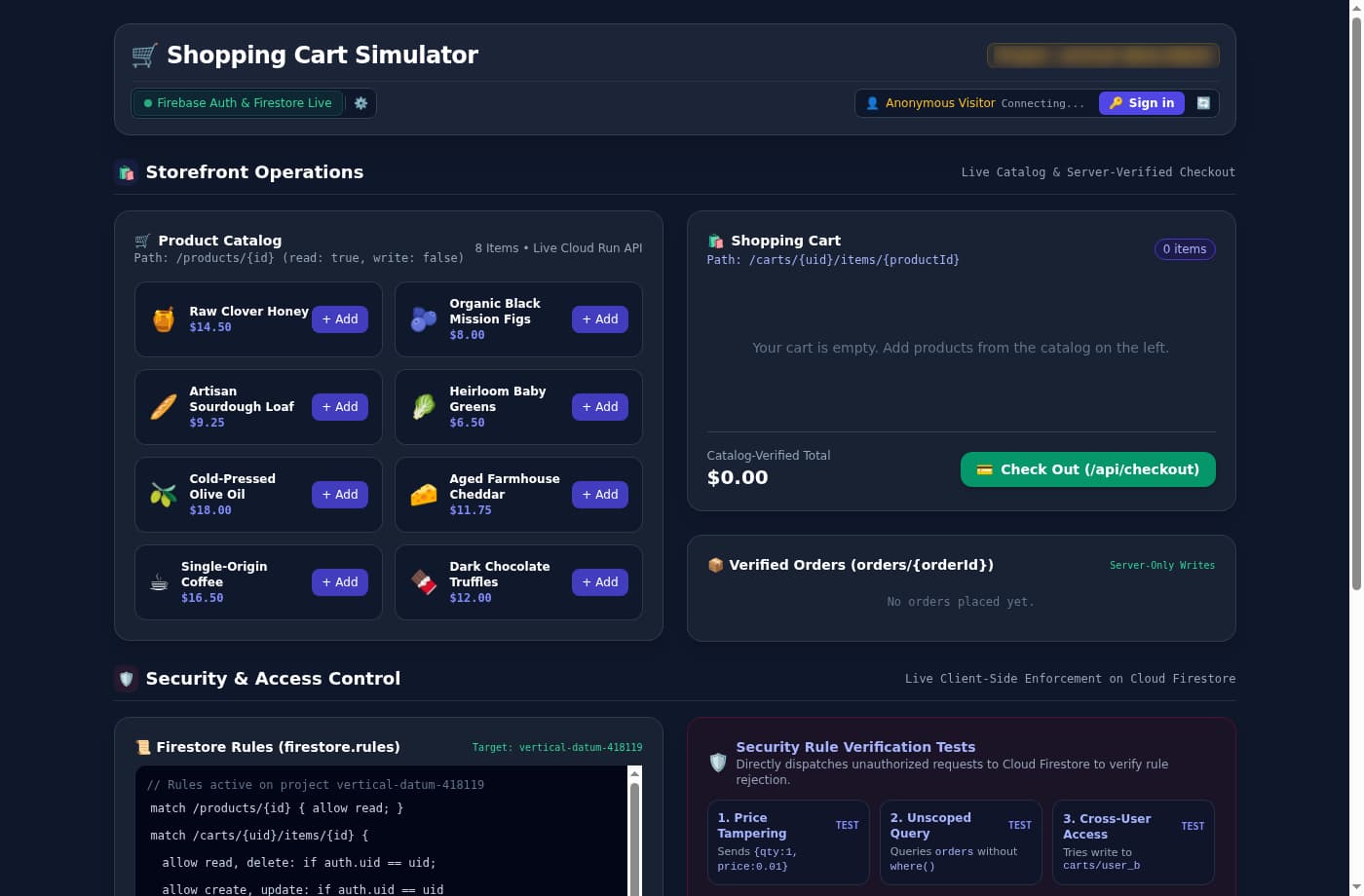
In this article, we’ll show how to build a store that delivers guest onboarding, cart migration, and checkout using a Shopping Cart Simulator demo.
Why e-commerce breaks simple authentication models
Traditional web architectures separate unauthenticated session state from authenticated database records. In a typical online store, this creates an uncomfortable dilemma.
Requiring customers to create an account before adding items adds immediate friction and hurts conversion rates. Storing guest carts in browser local storage avoids a login wall, but it lacks real-time cloud synchronization and loses items if a shopper clears their cache or switches devices.
Maintaining temporary guest tables on a custom backend introduces its own headaches. Every signup requires custom data-handoff logic, database cleanup cron jobs, and the constant risk of dropped items if a network request fails during checkout.
You can eliminate this fragility by treating every visitor as a verified user from the moment they load the page.
Guest users with Firebase anonymous auth
Instead of managing separate guest tokens and authenticated sessions, you can use Firebase Anonymous Authentication to issue a genuine cryptographic identity as soon as the application initializes.
When a first-time visitor opens your store, the client calls signInAnonymously(). Firebase generates a unique user ID (uid) and signs an authentication token on Google servers. From the perspective of your database and backend APIs, an anonymous visitor is a first-class authenticated entity.
import { getAuth, signInAnonymously, onAuthStateChanged } from "firebase/auth";

const auth = getAuth();

onAuthStateChanged(auth, async (user) => {
  if (user) {
    // Session is active (either anonymous guest or permanent user)
    console.log(`Active session UID: ${user.uid} (Anonymous: ${user.isAnonymous})`);
    listenToUserCart(user.uid);
  } else {
    // No session exists: request a genuine anonymous identity
    try {
      const cred = await signInAnonymously(auth);
      console.log(`Minted anonymous UID: ${cred.user.uid}`);
    } catch (err) {
      console.error("Anonymous auth failed:", err.code, err.message);
    }
  }
});Because the anonymous uid is cryptographically signed, you can bind database permissions directly to it. The guest shopper gets immediate real-time cart updates across browser tabs without encountering a signup modal, and your backend never has to maintain custom guest session tables.
Keeping your shoppers’ carts secure
Granting client applications direct write access to Cloud Firestore enables fast UI updates, but it requires strict database rules to prevent tampering. In an e-commerce cart, you must guarantee three invariants:
- A user can only read and modify their own cart.
- A client can only specify product quantities, never item prices or account roles.
- Quantities must remain within valid numerical boundaries (for example, integers between 1 and 99 - a simple rule for this demo).
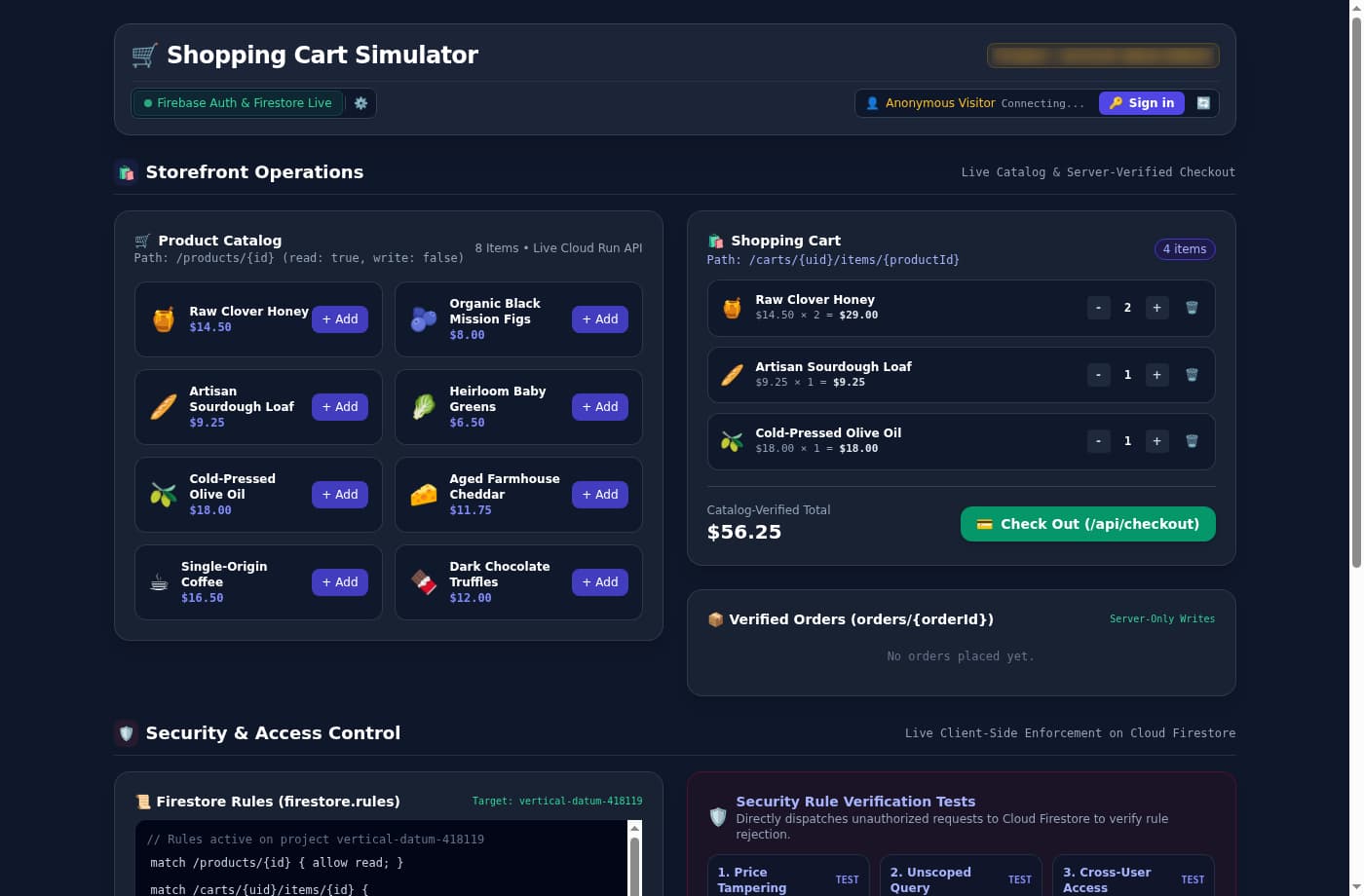
By structuring cart items in a subcollection scoped to the user ID (/carts/{uid}/items/{productId}), you can enforce these rules declaratively in Firebase Security Rules.
rules_version = '2';
service cloud.firestore {
  match /databases/{database}/documents {

    // Reusable ownership check
    function isOwner(uid) {
      return request.auth != null && request.auth.uid == uid;
    }

    // Product catalog: publicly readable, client writes forbidden
    match /products/{id} {
      allow read: if true;
      allow write: if false;
    }

    // User cart subcollection: scoped strictly to the path UID
    match /carts/{uid}/items/{id} {
      allow read, delete: if isOwner(uid);
      allow create, update: if isOwner(uid)
                             && request.resource.data.keys().hasOnly(['qty'])
                             && request.resource.data.qty is int
                             && request.resource.data.qty > 0
                             && request.resource.data.qty <= 99;
    }

    // User order history: readable only by order owner
    match /orders/{id} {
      allow get, list: if isOwner(resource.data.ownerUid);
      allow write: if false;
    }
  }
}Defining isOwner(uid) as a reusable custom function encapsulates authentication and path authorization across multiple operations.
Notice the .keys().hasOnly(['qty']) constraint. If a malicious user opens their browser console and attempts to send { qty: 1, price: 0.01 } to the database, Firestore rejects the write with an HTTP 403 permission error before anything is committed to disk. The client has total freedom to update item quantities in real time, but zero ability to influence pricing or access another user’s cart.
Upgrading guests and merging conflicting cart data
When an anonymous guest decides to create an account or sign into an existing profile, your application must handle the transition without losing data.
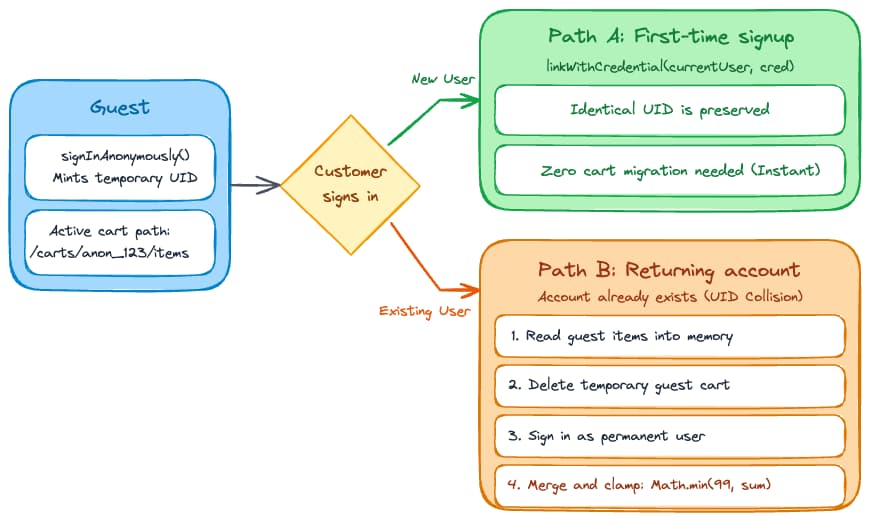
There are two distinct conversion paths depending on whether the customer is creating a brand new account or logging into an existing one:
Path 1: Direct account linking for new users
If the customer is signing up for the first time, you can attach their new credentials (such as an email and password or a Google OAuth token) directly to their existing anonymous account using linkWithCredential().
import { EmailAuthProvider, linkWithCredential } from "firebase/auth";

async function upgradeAnonymousAccount(email, password) {
  const credential = EmailAuthProvider.credential(email, password);
  try {
    const userCred = await linkWithCredential(auth.currentUser, credential);
    console.log("Account upgraded. UID remains unchanged:", userCred.user.uid);
  } catch (err) {
    console.error("Linking failed:", err.code);
  }
}When account linking succeeds, the user’s uid stays exactly the same. All Firestore documents stored under /carts/{uid}/items remain immediately accessible without copying a single byte of database storage.
Path 2: Conflict migration for returning users
Account linking fails with a credential collision error (auth/credential-already-in-use) when a shopper signs into an account that already exists. In this scenario, the returning account has its own permanent uid and may already contain items from a previous session.
Because both the guest and the returning customer are verified cryptographic identities in Firestore, you don’t need backend session tables. Instead, you can reconcile the carts deterministically on the client using atomic batch writes:
import { signInWithEmailAndPassword } from "firebase/auth";
import { collection, getDocs, writeBatch, doc, getDoc } from "firebase/firestore";

async function migrateAndSignIn(email, password) {
  const guestUid = auth.currentUser?.uid;

  // Step 1: Read current guest cart items from Firestore into memory
  const guestItems = {};
  const guestSnap = await getDocs(collection(db, "carts", guestUid, "items"));
  guestSnap.forEach(d => { guestItems[d.id] = d.data(); });

  // Step 2: Delete guest cart documents to prevent orphaned database records
  const deleteBatch = writeBatch(db);
  guestSnap.forEach(d => deleteBatch.delete(d.ref));
  await deleteBatch.commit();

  // Step 3: Authenticate as the returning permanent user
  const userCred = await signInWithEmailAndPassword(auth, email, password);
  const returningUid = userCred.user.uid;

  // Step 4: Merge guest items into the returning user's cart in Firestore
  const mergeBatch = writeBatch(db);
  for (const [pid, data] of Object.entries(guestItems)) {
    const itemRef = doc(db, "carts", returningUid, "items", pid);
    const existingDoc = await getDoc(itemRef);
    const existingQty = existingDoc.exists() ? (existingDoc.data().qty || 0) : 0;
    const mergedQty = Math.min(99, existingQty + (data.qty || 1));
    mergeBatch.set(itemRef, { qty: mergedQty });
  }
  await mergeBatch.commit();
}By capping the merged quantity at the value of 99 (Math.min(99, existingQty + (data.qty || 1))), the migration logic prevents malicious clients from submitting unreasonable values.
Why database rules never filter collection queries
Once a customer places an order, they expect to see their order history in their account dashboard. A common mistake when querying collections in Firestore is expecting security rules to act as automatic query filters, but rules are not filters.
Consider the security rule for the /orders collection:
match /orders/{id} {
  allow get, list: if request.auth != null
                    && request.auth.uid == resource.data.ownerUid;
  allow write: if false;
}If your frontend client executes an unscoped query like getDocs(collection(db, "orders")), Firestore rejects the request immediately with a permission error. This happens even if the database only contains orders belonging to that specific user.
In Cloud Firestore, rules evaluate the query constraints, not the individual documents in the database. For a list query to succeed, the client request must explicitly include a where() filter that matches the security rule condition:
import { collection, query, where, getDocs } from "firebase/firestore";

async function fetchUserOrders(uid) {
  // Must explicitly filter by ownerUid to satisfy security rules
  const ordersQuery = query(
    collection(db, "orders"),
    where("ownerUid", "==", uid)
  );
  const snapshot = await getDocs(ordersQuery);
  return snapshot.docs.map(doc => ({ id: doc.id, ...doc.data() }));
}When the query filter matches the rule authorization boundary (where("ownerUid", "==", uid)), Firestore verifies that the query can never return unauthorized data and completes the read request.
Enforcing pricing authority on a Cloud Run backend
While client-side database writes provide an excellent user experience for cart management, you should never allow frontend applications to write confirmed order records. In our security rules, the /orders/{id} path explicitly specifies allow write: if false;.
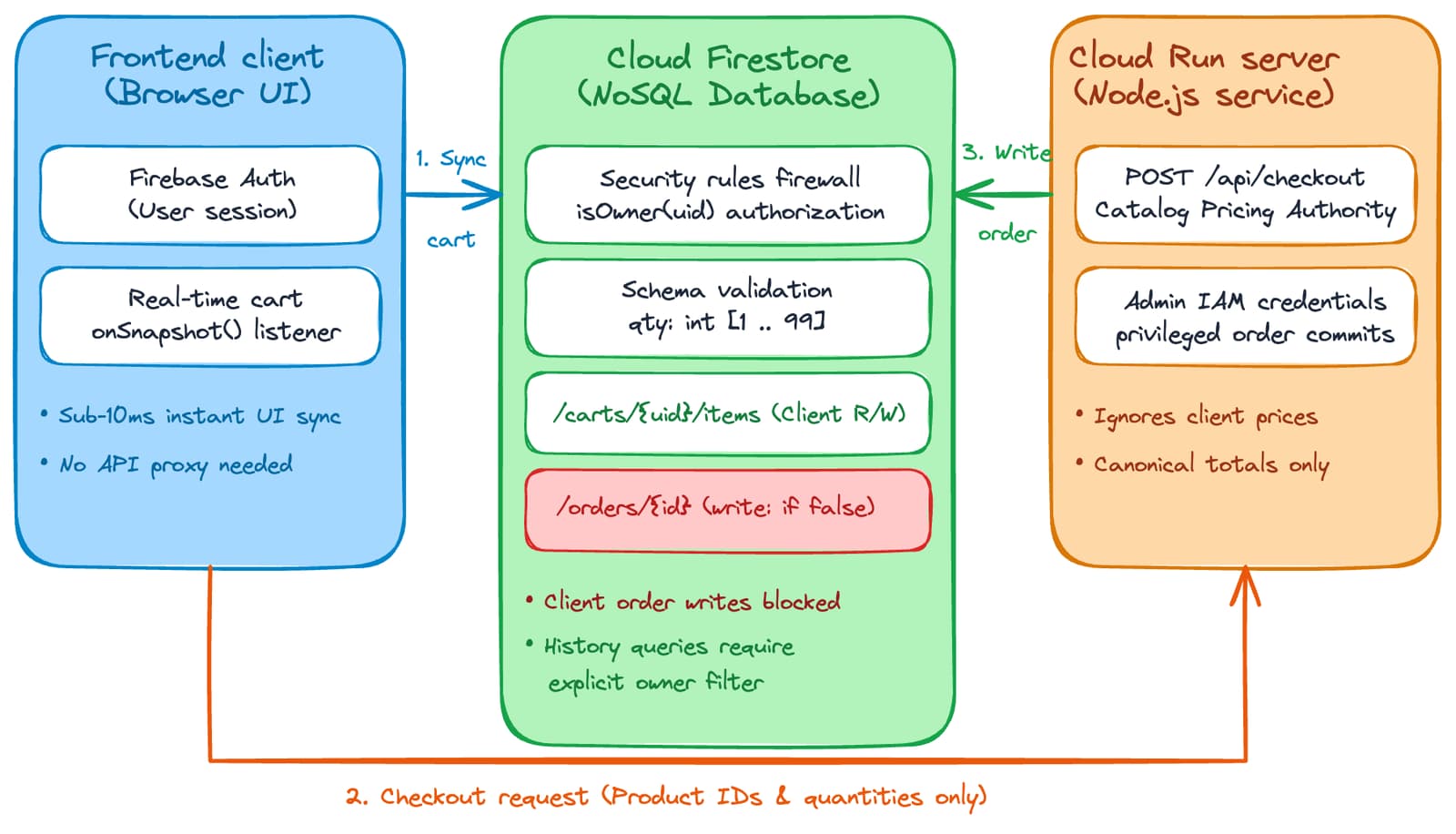
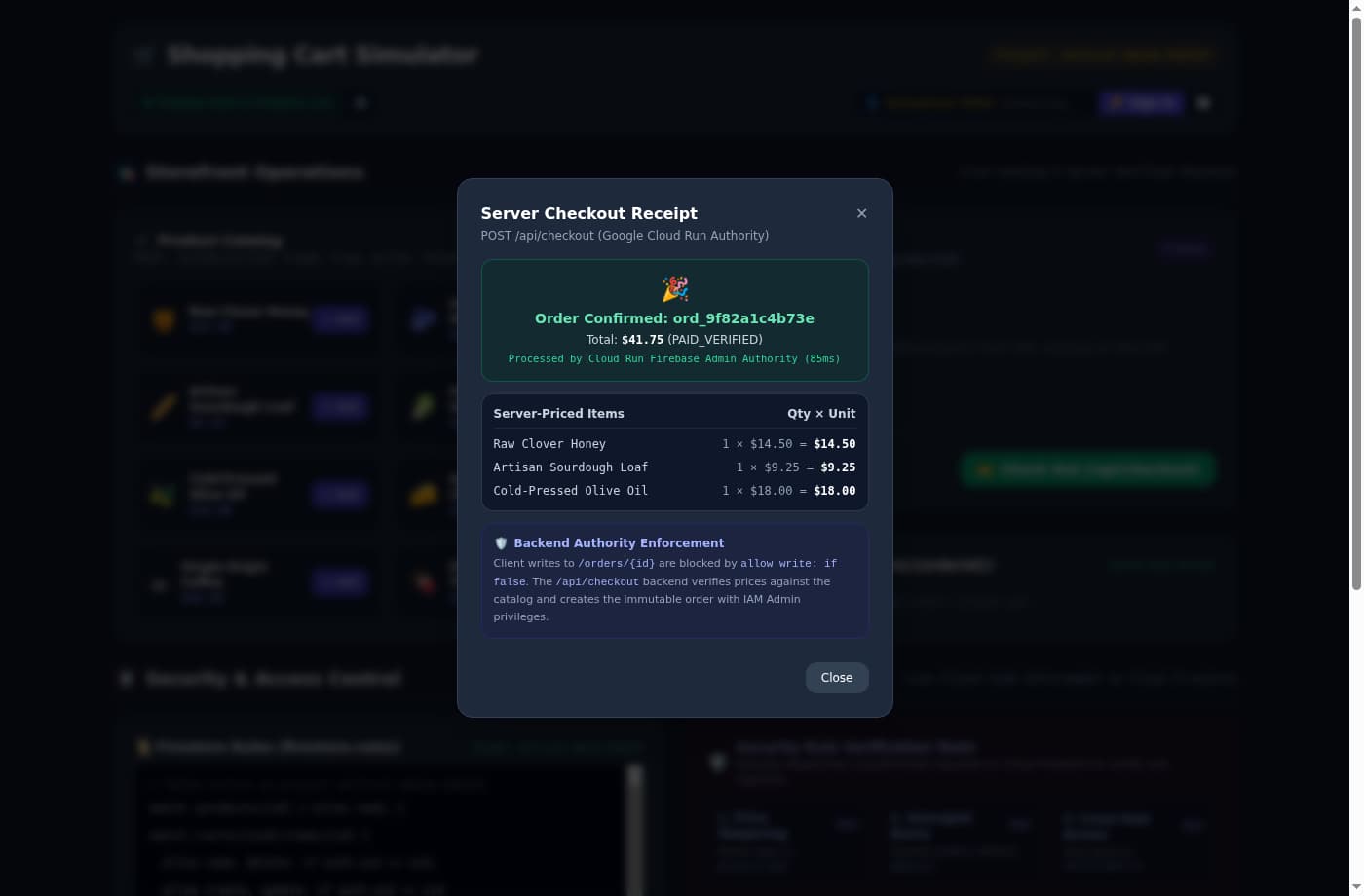
To process a checkout securely, the browser sends the product IDs and quantities alongside its Firebase ID token to a backend service on Cloud Run. Built with Node.js, the server cryptographically verifies the token, queries the canonical product catalog to calculate the verified total, and writes the order to Firestore using Google Cloud IAM service account privileges.
// POST /api/checkout handler on Cloud Run
async function handleCheckout(req, res) {
  // 1. Verify caller's Firebase ID token
  const authHeader = req.headers.authorization || "";
  const token = authHeader.startsWith("Bearer ") ? authHeader.split("Bearer ")[1] : null;
  if (!token) {
    return res.status(401).json({ error: "Missing authorization token." });
  }

  let uid;
  try {
    const decodedToken = await admin.auth().verifyIdToken(token);
    uid = decodedToken.uid; // Verified cryptographic identity
  } catch (err) {
    return res.status(401).json({ error: "Invalid or expired token." });
  }

  // 2. Validate cart payload
  const { items } = req.body;
  const itemKeys = Object.keys(items || {});
  if (itemKeys.length === 0) {
    return res.status(400).json({ error: "Cart is empty." });
  }

  let totalAmount = 0;
  const verifiedLines = [];

  for (const pid of itemKeys) {
    // Look up canonical price from server catalog; ignore client prices
    const product = DEFAULT_PRODUCTS.find(p => p.id === pid);
    if (!product) continue;

    const rawQty = items[pid]?.qty || items[pid] || 1;
    const qty = Math.max(1, Math.min(99, parseInt(rawQty, 10) || 1));
    const lineTotal = product.price * qty;
    totalAmount += lineTotal;

    verifiedLines.push({
      productId: pid,
      name: product.name,
      unitPrice: product.price,
      qty: qty,
      lineTotal: Number(lineTotal.toFixed(2))
    });
  }

  const finalTotal = Number(totalAmount.toFixed(2));
  const orderId = `ord_${Math.random().toString(36).substring(2, 9)}`;

  // 3. Write immutable order to Firestore via Admin SDK & IAM privileges
  await writeFirestoreOrder(orderId, uid, finalTotal, verifiedLines);
  await clearUserCart(uid);

  res.status(200).json({
    success: true,
    order: { orderId, ownerUid: uid, total: finalTotal, lines: verifiedLines }
  });
}Because the Cloud Run service account operates with administrative IAM permissions, it bypasses client security rules to create the verified order and empty the user’s shopping cart. This separation of responsibilities keeps your UI snappy while ensuring your financial transactions remain authoritative.
If you prefer not to manage a custom Express server on Cloud Run, you can implement this exact handler as a Firebase Callable Function (onCall). Callable functions handle authentication verification automatically on request.auth.uid and support Firebase App Check out of the box to protect your checkout endpoint from automated bot traffic.
Summary of architectural responsibilities
Dividing your e-commerce application across these three layers provides a clean separation between user experience and data security:
| System layer | Primary responsibility | Key security mechanism |
|---|---|---|
| Browser client | Real-time UI rendering and session continuity | Uses Firebase Anonymous Auth on load; sets order quantities but never calculates final prices |
| Firestore rules | Data ownership and schema verification | Enforces /carts/{uid} path isolation and .hasOnly(['qty']) field rules |
| Cloud Run backend | Price calculation and immutable order storage | Looks up canonical catalog prices and writes orders via IAM privileges |
Try the demo and explore the code
You can run the Shopping Cart Simulator to test all of these authentication flows, execute live rule verification tests, and inspect database audit logs.
To explore the implementation details or deploy this architecture to your own Google Cloud project:
- Source Code: Clone and run the complete sample from
GoogleCloudPlatform/devrel-demos/app-dev/secure-shopping-carton GitHub. - Documentation & Rules: Review the official Firebase Security Rules guide and Google Cloud Run documentation.
If you want to talk more about modern web applications and Firebase, follow me on X, LinkedIn, or Bluesky.