

Firebase Cloud Messaging (FCM) v2 brings more predictability and reliability to remote notifications for the Android ecosystem. Start using FCM ACv2 today by following our guidelines.
For Android developers, FCM push notifications are essential for delivering real-time, engaging mobile experiences. But throughout the years, as the Android Ecosystem evolved, delivering push notifications across changes in battery management modes, power-saving states, and background queueing systems has introduced unpredictable delays. Non-deterministic delivery timelines directly impact user experience and decrease engagement across key app workflows.
The challenge: Solving last-mile notification delays
To understand the improvements in ACv2, let’s examine how legacy notification payloads flow to the Android OS.
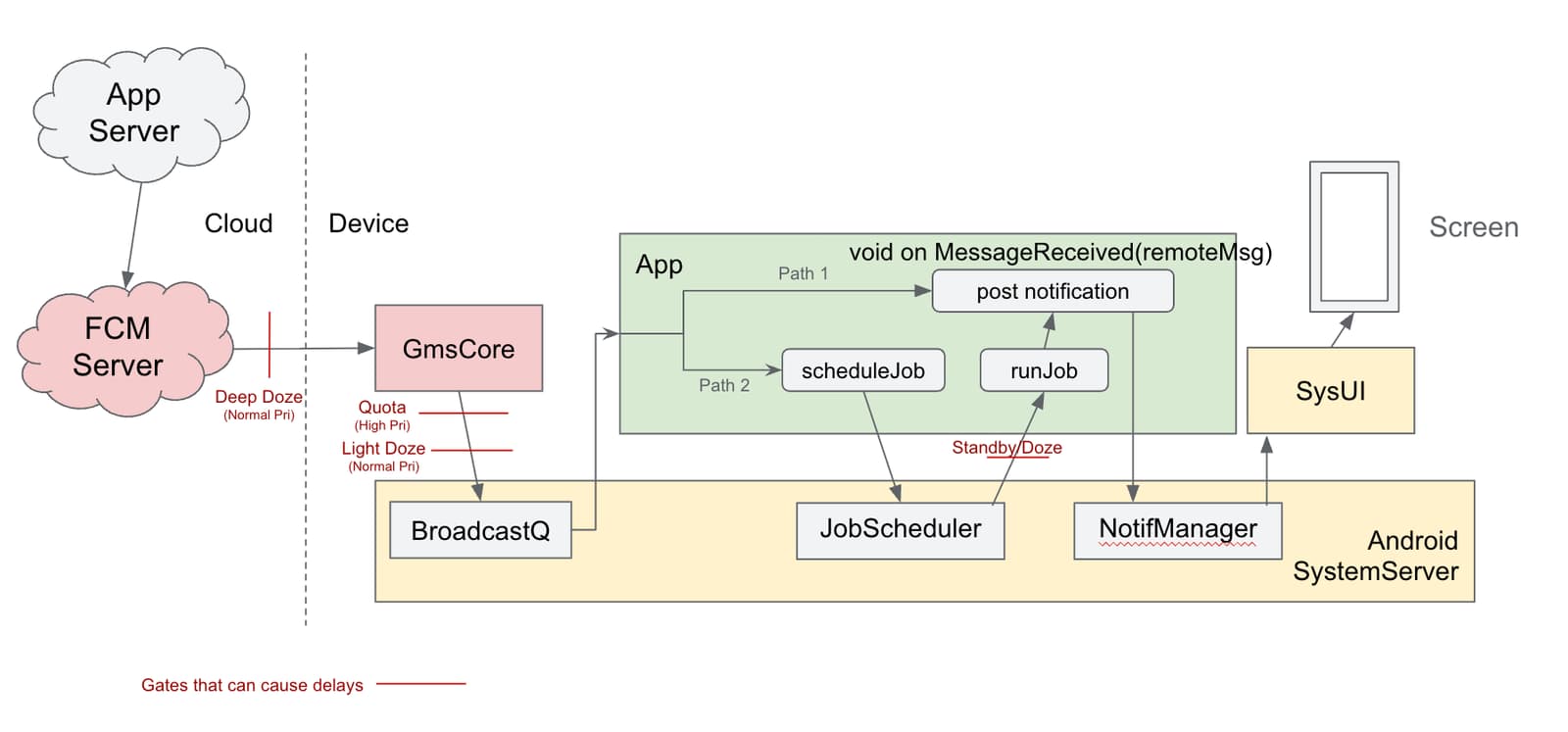
Under the v1 FCM payload structure, messages are dispatched via broad system broadcasts. Once received on the device by Google Play services (GMSCore), the message is handed over to the application through the single entry point in the FCM Android SDK, onMessageReceived.
This legacy model suffers from significant structural limitations. Because the legacy onMessageReceived callback has a void return type, the system receives zero feedback regarding whether the application successfully rendered a notification, ran out of background execution time, or crashed.
Android’s ecosystem has also grown complex. Evolving changes and restrictions on various device resources (battery management, doze modes, app standby buckets) have caused unpredictable message delays for an API that was designed in a different era.
Additionally, the v1 API does not provide clear, enforced guidelines for developers.
- On the client side, it fails to help applications easily maintain valid lifecycle states.
- On the server side, the legacy message priority API (high vs normal) often led developers to guesswork configuration settings rather than declaring explicit intent.
The solution
FCM ACv2 is an update that ensures timely notification delivery with a well-lit API that will make it easier for developers to do the right thing and difficult to do the wrong thing.
In v2, the new device data flow changes how the application handles messages for notifications. These changes allow for a modernized API with improved guard rails.
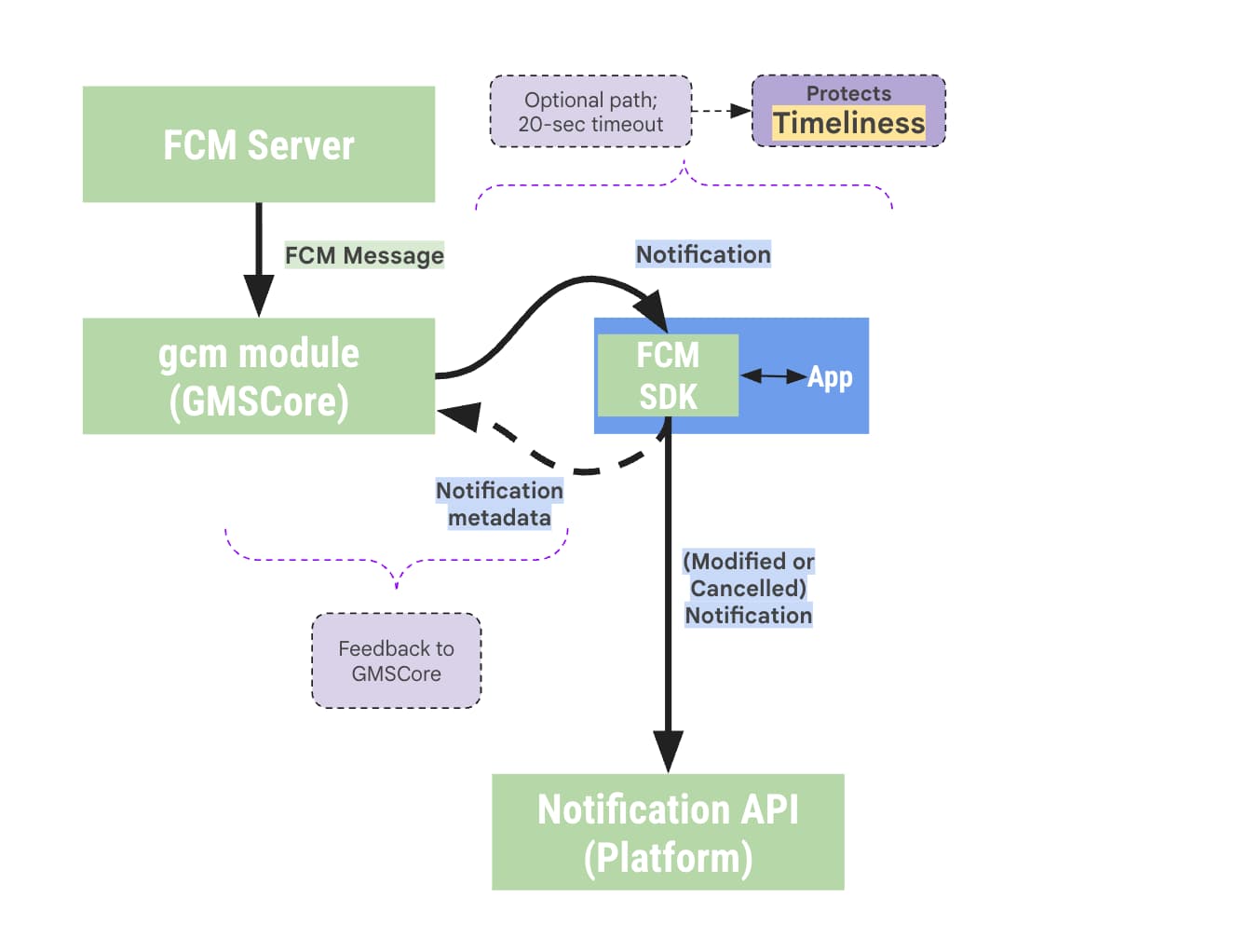
- On the client side, callbacks require developers to return a
NotificationResponseobject, providing metadata and feedback directly back to the platform; allowing the system to facilitate timeliness and reliability. On the device, the FCM SDK and GMS Core take primary ownership of posting the notification directly through Android’s Notification API, guaranteeing timely delivery even if app code to handle the notification is absent. - On the server side, ambiguous priority configurations (normal vs high) for messages are deprecated in favor of message intent-driven fields, BackgroundSync vs RemoteNotification.
A simpler API with intent-driven messaging
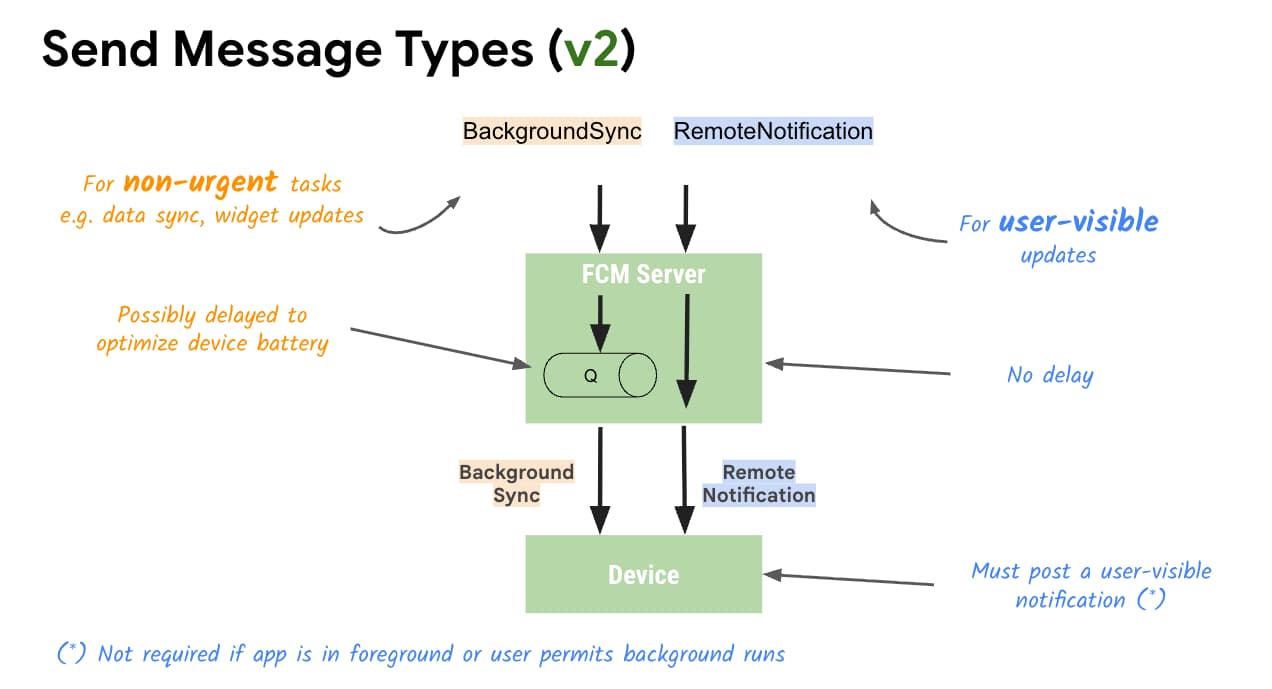
BackgroundSync(Non-Urgent Data Sync): Designed for data updates, cache refreshes, and state updates. Delivery is batched and scheduled to optimize battery health, preserving power without triggering unexpected user-facing notifications.RemoteNotification(Urgent & User-Visible): For time-sensitive, user-facing notifications. These messages bypass Doze restrictions and battery batching delays to alert users immediately.
RemoteNotification payload features
- Auto-Rendered Notifications: If
mutable_contentis set tofalse(default), GMS Core immediately renders and displays the server-provided notification payload to the status bar without waking application background code. - Mutable Content Customization: Setting
mutable_contenttotrueinstructs GMS Core to bind to the client application and invokeonNotificationReceived(RemoteMessage). Wherein the app can modify the notification: e.g. end-to-end encryption decryption, dynamic image attachment, or localized text rendering, prior to display. - Fallback Protection: A server-defined notification fallback payload is included within
remote_notificationeven whenmutable_contentis set totrue. GMS Core uses this backup payload if the application callback times out, crashes or exceeds operational suppression limits. - v1 Compatibility Flag: Set
use_as_v1_data_messagetotrueto ensure older client installations receive pure data broadcasts if migrating from legacy data-only structures.
BackgroundSync payload features
When issuing a background_sync payload, combine it with a collapse_key. If a device is offline, FCM collapses intermediate queued messages, delivering only the most recent data payload upon device wakeup. Both background_sync and remote_notification will continue to support the existing payload of up to 4KB of data.
Send request changes
The FCM AndroidConfigV2 API replaces generic configuration knobs with intent-oriented message types. Server-side requests now explicitly distinguish between AndroidRemoteNotification (remote_notification) for user-visible alerts and AndroidBackgroundSyncMessage (background_sync) for non-urgent tasks like background data synchronization. Delivery priority is inferred directly from the selected message type, and the structure remains backward compatible so server and client components can be upgraded independently.
An example of sending an android_v2 remote_notification payload via the FCM HTTP v1 messages:send endpoint with mutable_content enabled, a fallback notification, and custom data:
curl -X POST \
  "https://fcm.googleapis.com/v1/projects/${PROJECT_ID}/messages:send" \
  -H "Authorization: Bearer $(gcloud auth print-access-token)" \
  -H "Content-Type: application/json" \
  -d '{
    "message": {
      "token": "<DEVICE_REGISTRATION_TOKEN>",
      "android_v2": {
        "ttl": "3600s",
        "collapse_key": "chat_updates",
        "data": {
          "conversation_id": "12345"
        },
        "remote_notification": {
          "mutable_content": true,
          "notification": {
            "title": "New message",
            "body": "You have a new message",
            "channel_id": "messages"
          }
        }
      }
    }
}'Server-side send request restructuring
Updating server backend requests to support ACv2 is fully backward compatible. When target servers send ACv2, FCM automatically translates the message payload for devices running older client SDK versions, allowing backend teams to deploy updates without waiting for full app updates across user bases.
In your HTTP v1 REST payload, replace the legacy android configuration block with android_v2. Standard options such as time-to-live (TTL), collapse_key, and restricted_package_name remain configurable alongside your selected intent structure.
Modernizing client callbacks on Android
To handle v2 messages on Android, apps update their service extending FirebaseMessagingService. Instead of routing all incoming traffic through a central onMessageReceived() method, developers implement specialized callbacks.
1. Handling remote notifications (onNotificationReceived)
When a RemoteNotification arrives with mutable_content: true, GMS Core binds directly to the app and calls onNotificationReceived(message). The method requires returning a NotificationResponse object to give explicit feedback back to the platform:
- Modifying notifications: Construct a
Notificationand wrap it inNotificationResponse.create(). Values from the server fallback payload can be read directly from the incoming message while adding local enrichments. - Suppressing notifications: If the user currently has the relevant activity or active chat open, suppress display by returning
NotificationResponse.suppress(). - Streaming and Cancelling (
FcmNotificationManager): For advanced workflows—such as posting grouped conversation summaries or cancelling outdated alerts before displaying new ones—retrieve an instance ofFcmNotificationManagerusinggetFcmNotificationManager(message). Developers can invokepostNow()andcancelNow()in a streaming sequence before returningmanager.finished().
An example of the v2 way of handling a RemoteNotification when mutable_content is set to true:
// Common case

@Override
public NotificationResponse onNotificationReceived(
    RemoteMessage message) {
  // create the notification...
  return NotificationResponse.post("tag1", 1, new Notification());
}A more advanced example of handling a RemoteNotification, posting and cancelling multiple notifications, achieved via FcmNotificationManager:
// Advanced use - post & cancel multiple notifications
@Override
public NotificationResponse onNotificationReceived(RemoteMessage message) {
  FcmNotificationManager manager =
      getFcmNotificationManager(message);
  for (int i = 0; i < 10; i++) {
    // posts and cancels are immediate
    manager.postNow("tag" + i, i, new Notification());
    manager.cancelNow("tag" + i, i);
  }
  return manager.finished(); // invalidates the manager
}2. Handling background synchronization (onBackgroundSyncReceived)
For non-urgent data operations, override onBackgroundSyncReceived(). Because BackgroundSync is optimized for background work, posting user-visible UI notifications from this callback is discouraged.
3. Handling queue cleanups (onDeletedMessages)
If a device remains offline for an extended period or server queues exceed capacity limits, pending messages may be dropped prior to delivery. Overriding onDeletedMessages() allows your application to schedule a complete state resynchronization with your application server.
Policy enforcement: Timeliness and suppression limits
To ensure system reliability across the Android ecosystem, there are strict operational boundaries to RemoteNotification processing:
- 20-Second Processing Timeout: When
mutable_contentis enabled,onNotificationReceived(RemoteMessage)must return a validNotificationResponsewithin 20 seconds. If execution times out, GMS Core automatically renders and posts the default server fallback notification. - 25% Background Suppression Limit: Apps can suppress up to 25% of background notification traffic before original notifications are automatically posted; foreground suppressions and apps with unrestricted background permissions are exempt.
Migration summary and next steps
Adopting AndroidConfigV2 resolves notification delay issues and simplifies client-side service handling. Because server payloads and client callbacks are designed for incremental rollout, engineering teams can begin updating backend messaging schemas immediately, followed by upgrading client SDK handlers.
Start by updating server send pipelines to output android_v2 structures, and review your Android client service implementations to adopt onNotificationReceived(RemoteMessage) and onBackgroundSyncReceived(RemoteMessage) today.
Legacy v1 vs. new v2 API
| Feature | Legacy (ACv1) | New (ACv2) |
|---|---|---|
| Priority Definition | Explicit priority: "high" or "normal" |
Implied by message type remote_notification vs background_sync |
| Notification Posting | App manually invokes NotificationManager.notify() |
FCM SDK / GMS Core posts directly or via structured NotificationResponse |
| Client Callbacks | onMessageReceived(RemoteMessage) onDeletedMessages() |
onNotificationReceived(RemoteMessage), onBackgroundSyncReceived(RemoteMessage), onDeletedMessages() |