
As you start maturing an app’s genAI feature from prototype to production, two major challenges often emerge: keeping sensitive prompts secure and managing the rapid pace of change in AI models.
We’re excited to introduce server prompt templates for Firebase AI Logic, a new feature designed to help you address both these challenges by moving your prompt logic off the client and into Firebase’s secure server infrastructure.
The challenge with client-side prompts
When using client SDKs to call the Gemini API directly, your prompts — which often contain intellectual property, specific behavioral instructions, or complex logical structures — must be sent from the client app.
This client architecture can expose your prompts to potential network interception or decompilation if embedded in your app binary. Furthermore, if you want to tweak a system instruction or upgrade to a newer model version, you might have to release a full app update or build your own prompt hosting system (which is possible by using Firebase Remote Config and Cloud Storage).
Introducing server prompt templates
Server prompt templates allow you to store your prompts (user and system instructions), schema, and model configurations securely on Firebase servers. Instead of hardcoding the full prompt in your mobile or web app, your client code simply references a unique template ID and sends only the necessary variable values (like user input).
Firebase AI Logic then composes the full prompt server-side, executes the request against the Gemini API, and returns the response to your client.
Enhanced security and abuse prevention
By centralizing your prompts on the server, the complete prompt string is not
exposed to the client, significantly mitigating the risk of prompt extraction.
Beyond just hiding your prompt’s intellectual property, this enables better
abuse prevention through strict parameterization. Because your client code
only sends variable values rather than complete instructions, you effectively
constrain the model’s output for those requests. Even if a bad actor attempts to
manipulate legitimate client traffic, they’re restricted to the specific
restrictions your template defines (for example, “generate a small JSON object
for a game character” rather than “generate a 2,000-word essay”).
Faster iteration without app updates
The AI landscape changes quickly. New and updated models are released several times per year, and old models are deprecated. Server prompt templates decouple your generative logic from your application code.
Need to switch your production app from gemini-2.5-flash to gemini-2.5-pro?
Or perhaps you realized your system instructions need a tweak to prevent
hallucinated answers? You can make these changes instantly in the Firebase
console without releasing a new version of your mobile or web app.
How it works
We’ve based the template system on the Dotprompt syntax, an open standard for defining prompts. It uses YAML frontmatter for configuration and standard Handlebars syntax for variable replacement. While this initial release does not implement the complete Dotprompt specification, we will be embracing more of its capabilities as the product evolves and as needed by the community.
Manage prompts via the Firebase console
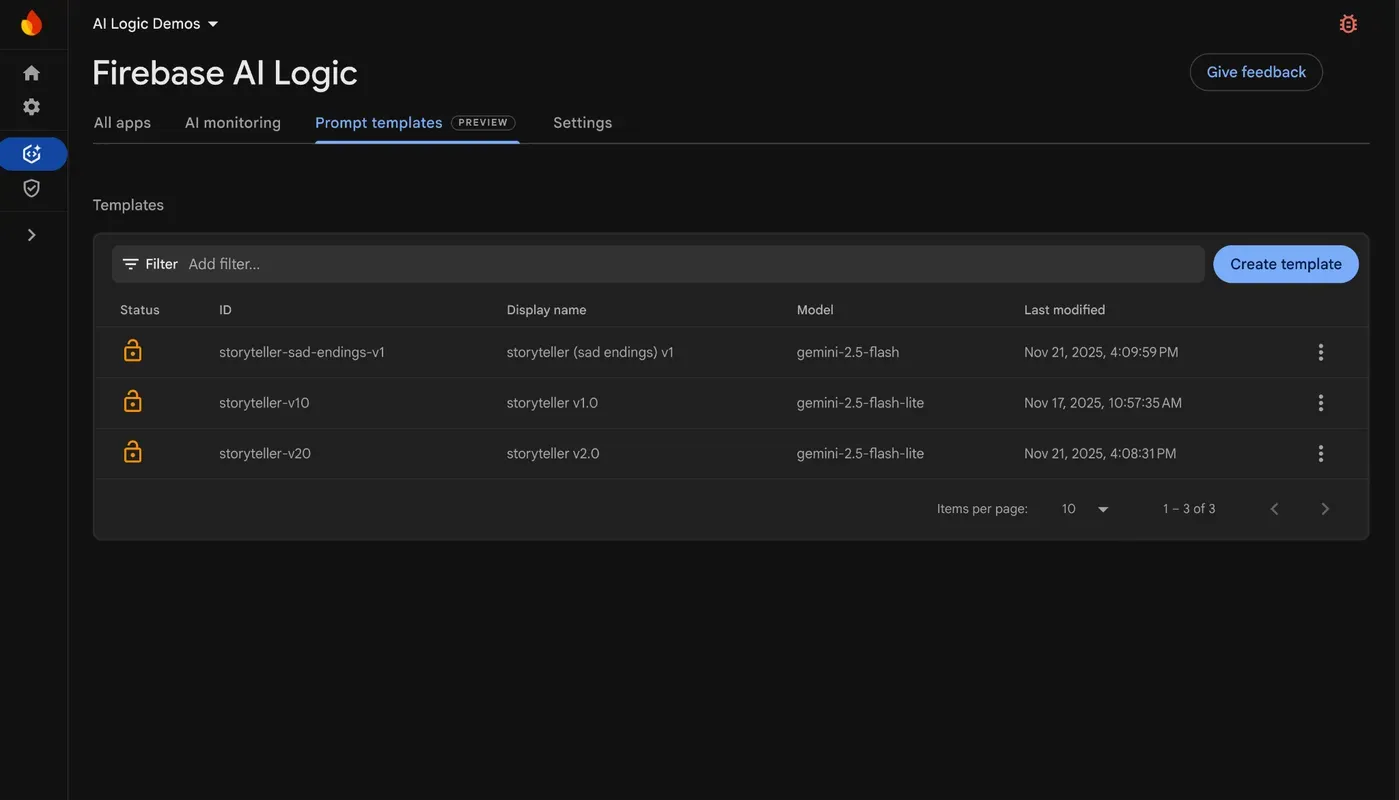
You can create, edit, and test these templates directly in the Firebase console with a guided UI. The Prompt Templates section within the Firebase console is your central hub for managing your project’s server prompt templates. Simply click the “Create template” button, select a starter template—for instance, “Input + System Instructions”—so that you don’t need to start from scratch, and begin editing and customizing the template for your app!
Adjust the template
In the Firebase console, you might define a template with the ID
storyteller-v1. In the configuration section, you specify the model and the
input schema, among other settings. One of the most powerful features is the
ability to define schemas to enforce input parameter types and constraints.
Setting up these constraints is key to reducing the risk of prompt injections.
In the example above, we are requesting that the input topic string length does
not surpass 40 characters. These constraints and validations are applied
before the prompt is composed, enhancing security.
---
model: 'gemini-2.5-flash-lite'
input:
  schema:
    topic:
      type: 'string'
      minLength: 2
      maxLength: 40
    length:
      type: 'number'
      minimum: 1
      maximum: 200
    language:
      type: 'string'

---
Within the sections designated for your prompt and system instructions, you
have the flexibility to use input variables through Handlebars syntax. While
this example illustrates a straightforward scenario, for more complex prompt
construction, you´re fully enabled to employ advanced features such as
conditional blocks (like #if, else, and #unless) and iteration
(#each).
{{role "system"}}
You're a storyteller that tells nice and joyful stories with happy endings.

{{role "user"}}
Create a story about {{topic}} with the length of {{length}} words in the {{language}} language.
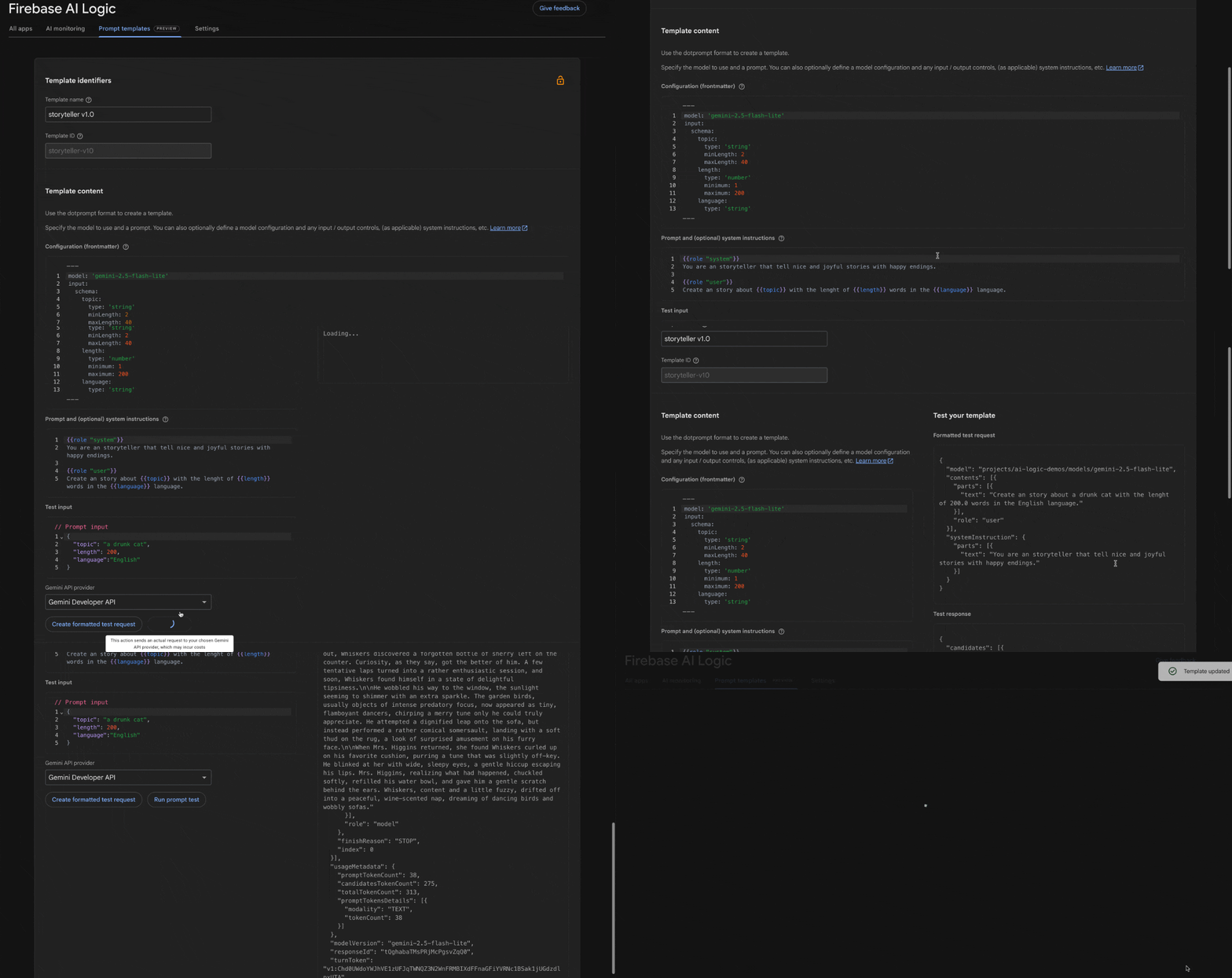
Once you’ve finished crafting your template, it’s time to put it to the test! The prompt template editor lets you execute a test directly within the interface. You just need to supply the required input values and run the prompt test to fully validate that your prompt performs exactly as you intended.
Crafting the client-side code
In your application code, you’ve completely eliminated the need to manage prompts, system instructions, or even model names. Your client application simply calls the template.
You’ll find an Android Kotlin code snippet below, but keep in mind that server prompt templates are accessible across all the SDKs supported by Firebase AI Logic, including iOS Swift, Flutter, Web, and Unity.
val generativeModel = Firebase.ai.templateGenerativeModel()
val response = generativeModel.generateContent("storyteller-v10",
    mapOf(
        "topic" to topic,
        "length" to length,
     	"language" to language
    )
)
_output.value = response.text
Once your application is live and utilizing a server prompt template, you’ll naturally want to prevent accidental modifications that could disrupt your app and lead to a poor user experience. To safeguard your production templates, simply use the “Lock” button in the Firebase console to make them read-only, ensuring stability and preventing unauthorized changes.
Get started
Server prompt templates currently support most Gemini and Imagen models, with support for text-and-image (multimodal) inputs, standard system instructions, and standard model configurations.
During the following months, we will continue improving the service, adding support for tools (like function calling and built-in tools), chat experiences, integration with AI monitoring, and more.
To start securing your prompts and speeding up your iteration cycles, head over to the AI Logic tab in the Firebase console and create your first template today.
Happy coding!