


We’re thrilled to announce that Firebase A/B Testing is now available for the web!
Firebase has long offered a simple way to run A/B tests for mobile apps, and now, powered by Google Analytics and Firebase Remote Config, we’re bringing that same functionality to the web. This means that all of the benefits of A/B Testing, like easily being able to run, analyze and scale product and marketing experiments to optimize your app experiences that lead to massive growth in user retention and app revenue for mobile apps, are now available for your web apps too.
If you’ve ever wondered which version of your web content, feature, or design will best resonate with your users, or how to optimize app retention based on your app onboarding flow or in-app engagements, running an A/B test is the way to go.
Why use Firebase A/B Testing?
Achieve your business goals
Firebase A/B Testing provides direct insight into how app changes affect your most critical business metrics. Out-of-the-box tracking for user retention, revenue, and user engagement—combined with Google Analytics integration lets you see exactly how user actions shift within each experiment.
Roll out changes with confidence
Using the frequentist statistical method, Firebase A/B Testing helps you identify the best-performing variation and confirms if the results are statistically significant. This lets you to test, modify, and deploy updates without worrying about the potential repercussions of a new release.
Empower your team without eating up engineering time
While A/B testing usually requires significant infrastructure, Firebase makes setup quick and easy. Once configured, anyone in your organization can run and analyze experiments, allowing your team to iterate faster and at a larger scale without constantly relying on engineering resources.
A/B Testing for Web use cases
With the above capabilities in mind, let’s take a look at some of the key use cases for the web where Firebase A/B Testing can help you move beyond guesswork and make data-backed decisions that drive real impact:
- Test content variations: Experiment with content headlines, blog post tones, product descriptions, layouts, and more depending on your app to see what resonates with your users most.
- Optimize user flows: Improve critical user journeys by testing app onboarding and signup processes, checkout flows, navigation paths and more.
- Improve feature adoption: Test different feature ideas and discover the most effective way to introduce a new feature to maximize its usage.
- Drive business goals: Optimize for key metrics like conversions, revenue, user retention, and engagement.
Integrating Firebase A/B Testing into your web apps is easy - let’s walk through a couple of examples to see how it works in action.
An Example: Optimizing Blog Subscriptions
Let’s look at an example - say you have a blog post platform and want to optimize the subscriptions your users get for their blogs. To increase reader sign-ups, you offer the choice of two blog post styles for the post teaser and post content - a “technical” style and a “relatable storytelling” tone.
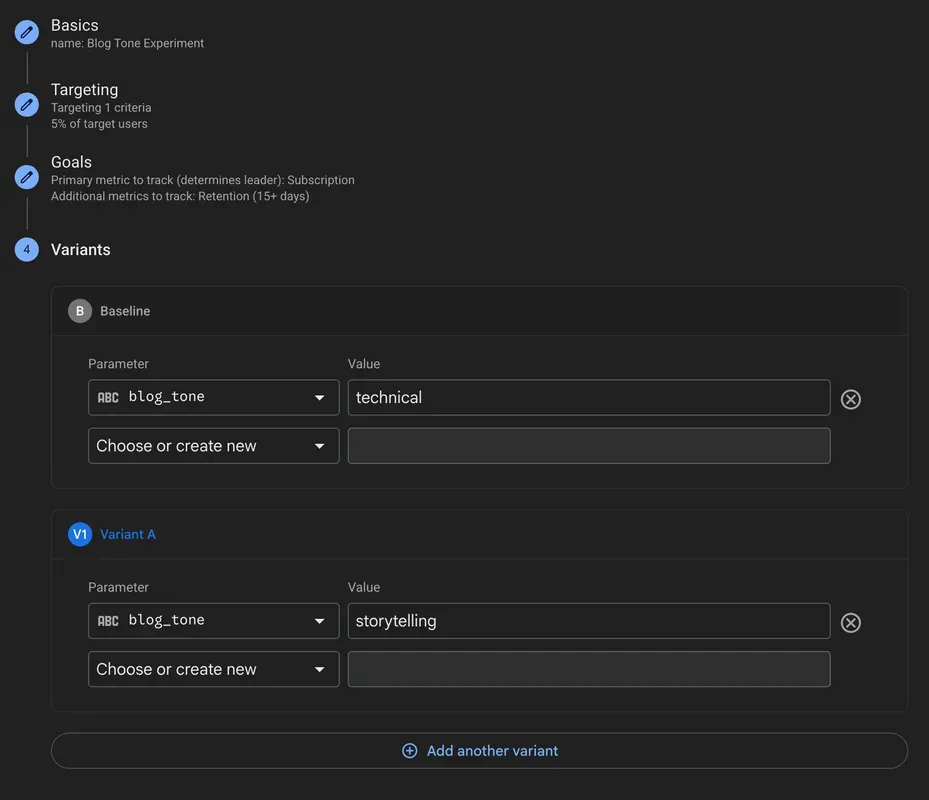
With Firebase A/B Testing for web, you can set up the experiment as follows:
- Define Variants: You can use Firebase Remote Config to introduce a
blog_toneparameter.- Baseline (Control):
blog_toneis set to"technical". - Variant A:
blog_toneis set to"storytelling".
- Baseline (Control):
- Serve Variations: Firebase automatically serves 50% of visitors the “technical” version and the other 50% the “storytelling” version.
- Set Objectives: The primary objective is “Subscription,” tracked by Google Analytics upon subscription. A secondary objective is “Retention” (measuring returning users). This ensures the winning variant drives the most subscriptions while providing insight into user retention.
Integrating A/B Testing into Your Code
Let’s assume you’ve got two versions of your users’ blog posts on your server - one optimized for each tone. Optionally, you could even use an AI model to automatically generate the blog post teaser content for your users based on these tones as well. With that content ready, you can use Firebase Remote Config to power the variation logic, showing readers the version that drives better subscription rates.
Here’s a simplified JavaScript snippet showing how your web app fetches the blog_tone parameter and matching blog post content from your server. Also, don’t forget to include the Firebase SDK for Google Analytics in your application as well to track the metrics necessary for your A/B test!
import { getAnalytics } from "firebase/analytics";

const analytics = getAnalytics(app);
const config = getRemoteConfig(app);

const blogTone = getString(config, 'blog_tone');
const content = await backend.fetchContent(blogTone);Analyzing the Results
After a few days of letting the experiment run, you can check the Firebase console to view the results of the test.
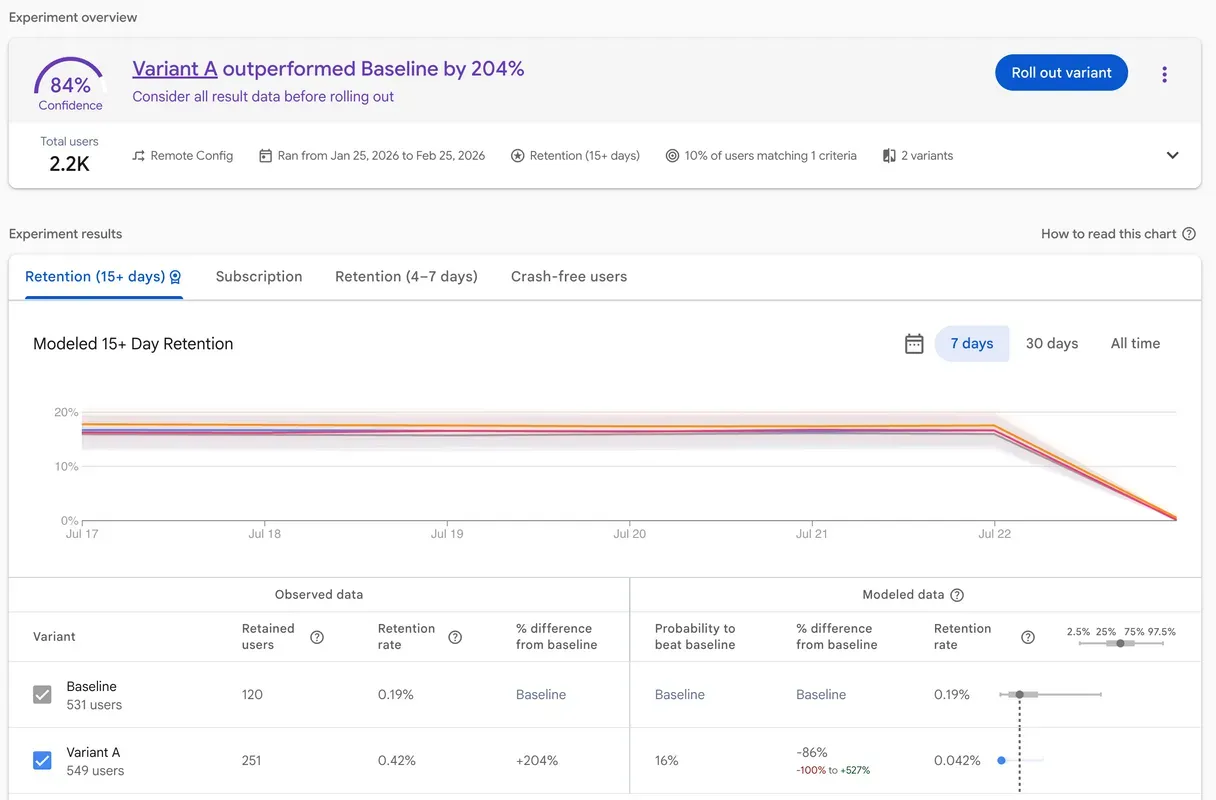
The A/B Testing report shown in the following screenshot, drawing on Google Analytics data, clearly shows which blog tone led to better user retention.
This data empowers you to confidently roll out the winning tone to all users, directly impacting your users blog post subscription success and revenue.
While a quick summary is available in the Firebase console, you can also dive deeper using BigQuery. Just remember that only Google Analytics events triggered by users participating in the A/B test will include the associated experiment and variant information. This means you can run custom queries against the Analytics event tables to get detailed insights specific to the experiment.
Another Example: Test onboarding flows in your web app
Let’s look at another example - this time, let’s say you have a React web application and want to A/B test two (or three) different onboarding flows to see which one leads to the highest user retention in your app.
One way to do this would be to create a Remote Config custom hook with useState and useEffect to retrieve the A/B test variant parameter values and let that drive the UI changes in your app to test out different onboarding flows or other layouts.
First, let’s set up the experiment similar to what we did in the previous example for optimizing blog post subscriptions:
- Define Variants: Here we’ll use Firebase Remote Config to introduce a new parameter called
onboarding_flow.- Baseline (Control):
onboarding_flowis set to"standard". - Variant A:
onboarding_flowis set to"new_design".
- Baseline (Control):
- Serve Variations: Firebase automatically serves 50% of visitors the “standard” version and the other 50% the “modern” version.
- Set Objectives: Your primary objective is “User Engagement,” tracked by Google Analytics. A secondary objective is “Retention” (measuring returning users). This ensures the winning variant drives the most user engagement while providing insight into user retention.
Now you can create a useRemoteConfig custom hook that you can use to fetch variant values to drive the flows or layouts in your app:
import { useState, useEffect } from 'react';
import { fetchAndActivate, getValue } from "firebase/remote-config";
import { remoteConfig } from "@/lib/firebase";

export function useRemoteConfig(key: string, defaultValue: string = 'standard') {
    // Initialize with defaultValue so the app renders immediately
    const [value, setValue] = useState<string>(defaultValue);

    useEffect(() => {
        // If Firebase isn't initialized (e.g. server-side), do nothing
        if (!remoteConfig) return;

        const fetchConfig = async () => {
            try {
                await fetchAndActivate(remoteConfig);
                const val = getValue(remoteConfig, key);
                console.log(`[RemoteConfig] Fetched value for ${key}:`, val.asString());
                setValue(val.asString());
            } catch (err) {
                console.error(`[RemoteConfig] Config fetch failed for ${key}. Using default: ${defaultValue}`, err);
                // We don't need to setValue here because it's already set to defaultValue
            }
        };

        fetchConfig();
    }, [key, defaultValue]);

    return value;
}Once created, you can use the new custom hook in the page where you want to test your onboarding flows:
import React, { Suspense } from 'react';
import { useRemoteConfig } from '@/hooks/useRemoteConfig';

// 1. Use React.lazy for code splitting
const StandardOnboarding = React.lazy(() => import('@/components/StandardOnboarding'));
const ModernOnboarding = React.lazy(() => import('@/components/ModernOnboarding'));

export default function App() {
  // Using default "standard" to prevent flash of loading or just testing default
  const onboardingFlow = useRemoteConfig("onboarding_flow", "standard");

  // onboardingFlow initializes to "standard" immediately.
  // The UI will transparently update if "new_design" is fetched in the hook.
  return (
    // 2. Wrap lazy components in Suspense
    <Suspense fallback={<div className="text-center mt-20 text-white">Loading component...</div>}>
      {onboardingFlow === "new_design" ? (
        <ModernOnboarding />
      ) : (
        <StandardOnboarding />
      )}
    </Suspense>
  );
}From there, you can analyze the results similarly to the previous blog post subscription example by letting the experiment run for a few days and visiting the A/B testing results page in the Firebase console to see if there is a measurable difference between your onboarding flow variants.
Ready to Get Started?
Firebase A/B Testing for web empowers you to move beyond guesswork and make data-backed decisions that drive real impact. Whether you’re a developer, product manager or a builder this tool is invaluable for optimizing your web presence.
Ready to get started? Dive into the official documentation:
- Firebase A/B Testing Documentation: https://firebase.google.com/docs/ab-testing
- Firebase Remote Config Documentation: https://firebase.google.com/docs/remote-config
- Google Analytics for Web: https://firebase.google.com/docs/analytics/get-started?platform=web
Also, try out Firebase A/B Testing for web in the Antigravity IDE! Just try asking the Antigravity IDE agent to design an A/B test for a component of your choice in your web app using Firebase A/B Testing and it should provide you with a reasonable implementation plan to get started!
We are constantly working on more exciting features. As always, if you have questions, use our support channels. If you have ideas for new features, let us know on User Voice.
Give web A/B testing a try and share your feedback. Let’s build better web experiences together! 🚀